Build a ChatBot to Increase Social Media and Website Sales
Part 1: Doing a Market Research
-
- Identify a Product: Choose a product that appeared on Shark Tank and is sold on both Amazon and the company’s website.
-
- The Woobles – Crochet Kit
-
- Identify a Product: Choose a product that appeared on Shark Tank and is sold on both Amazon and the company’s website.
-
- Market Analysis: Briefly analyze the product’s online sales channels and identify how a chatbot could improve customer interaction and sales.
-
- The Woobles are sold through the official website, Amazon, JOANN Fabrics, and Walmart.
-
- A chatbot for the Woobles could help prospective customers pick what character they wish to crochet and then help them if they have issues during assembly.
-
- Market Analysis: Briefly analyze the product’s online sales channels and identify how a chatbot could improve customer interaction and sales.
Part 2: Choosing a No-Code Chatbot Tool
-
- Research Tools: Look into no-code chatbot tools.
-
- a. Chatfuel – A powerful tool for building chatbots for Facebook Messenger without coding.
-
- b. ManyChat – Offers a visual builder for creating chatbots, primarily for Messenger.
-
- c. Tars – A versatile platform for building chatbots for websites, WhatsApp, and more.
-
- d. Botsify – A simple platform for creating AI chatbots for websites, Facebook Messenger, and other platforms.
-
- e. Landbot – Specializes in creating conversational websites with chatbot functionalities.
-
- f. MobileMonkey – Provides omnichannel chatbot solutions for SMS, Messenger, and more.
-
- g. Intercom – Offers business messaging with chatbot features for customer support and engagement.
-
- h. Drift – Focuses on conversational marketing and sales through chatbots.
-
- i. Flow XO – A comprehensive platform for building chatbots for Messenger, Slack, SMS, and web.
-
- j. Gupshup – Offers API-based chatbot development in addition to a no-code builder, supporting a wide range of messaging platforms.
-
- Research Tools: Look into no-code chatbot tools.
-
- Tool Selection: Pick one tool for your project. The tool could integrate with either the company’s website or within their social media channels. Write a couple sentences justifying your choice based on its features, ease of use, and suitability for the product.
-
- We Chose Intercom because the company Woobles would likely succeed even more if there was a chatbot that helped customers pick what Woobles they want to create and how to create them.
-
- Tool Selection: Pick one tool for your project. The tool could integrate with either the company’s website or within their social media channels. Write a couple sentences justifying your choice based on its features, ease of use, and suitability for the product.
Part 3: Chatbot Prototype
-
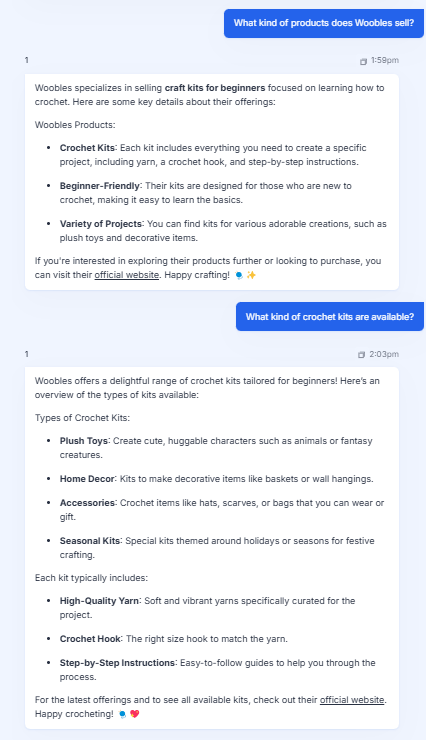
- Design a Prototype: Using the selected tool, create a basic chatbot prototype that can guide customers through the purchasing process. Include a screenshots and/or a link to your prototype.
-
- We weren’t able to understand how Intercom, but it showed great potential. We used Zapier.com to create the chatbot prototype.
-
- Design a Prototype: Using the selected tool, create a basic chatbot prototype that can guide customers through the purchasing process. Include a screenshots and/or a link to your prototype.
-
- Implementation Overview: Outline how this chatbot could be integrated into the product’s sales strategy.
- The chatbot could be implemented on the Woobles home screen as a pop-up that asks the user “How can I help?” or something similar. It can also promote DIY kits that are popular or on sale.
- Implementation Overview: Outline how this chatbot could be integrated into the product’s sales strategy.
Part 4: Reflection
-
- Reflect on the process of designing the chatbot and its potential impact on sales and customer engagement.
- Creating the chatbot was easy, and wouldn’t be too difficult for the company, Woobles to implement on their website.
- Reflect on the process of designing the chatbot and its potential impact on sales and customer engagement.